
.png)
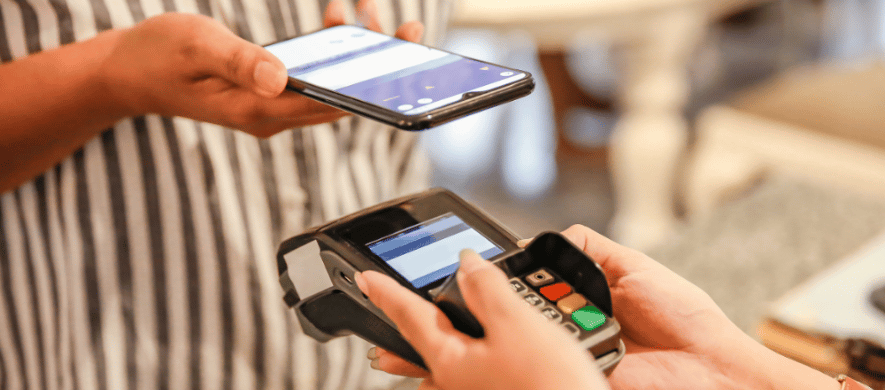
You tap your phone at the register, wait for the small buzz or beep, and you're done. No swiping, no inserting a card, no digging through your wallet for exact change. For a lot of Idahoans, this has quietly become the default payment method.
Contactless payments and digital wallets have moved from a novelty to a normal part of everyday shopping, both in store and online. But plenty of people still have questions about how the technology works, which apps actually do what, and how to get their own debit card set up. Here is what is worth knowing before your next trip to the store.
Key Takeaways
-
Contactless payments use near field communication to complete a purchase without swiping or inserting a card
-
Digital wallets such as Apple Pay, Google Pay, and Samsung Pay store credit and debit cards securely on a phone, tablet, or smartwatch
-
Tokenization means merchants never see your actual card number during a transaction
-
Many digital wallets can also hold loyalty cards, tickets, and passes alongside your payment cards
-
Eligible Farmers Bank debit cards can typically be added to a supported wallet app through the bank's mobile app
What Contactless Payments Actually Are
Contactless payment technology relies on near field communication, or NFC, a short-range wireless signal that lets a card or phone talk to a payment terminal. You hold your device within an inch or two of the contactless symbol on the terminal, and the transaction completes in seconds. Many credit and debit cards now include an NFC chip, marked by the same signal-style icon you see on contactless terminals at checkout.
The appeal is speed. There is no chip to insert and wait on, and no signature needed for most everyday purchases. Whether you are grabbing coffee or checking out at grocery stores, that difference adds up.
Digital Wallets: Apple Pay, Google Pay, and Beyond
A digital wallet takes contactless payment a step further. Instead of relying only on a physical card, apps like Apple Pay, Google Pay, and Samsung Pay let you store credit and debit cards directly on your phone or smartwatch. Google has also introduced Google Wallet, which works alongside Google Pay to hold cards, passes, and IDs in one place.
Once your card is added, you simply tap your device near the contactless terminal to pay, usually confirming with a fingerprint, face scan, or passcode first. Some wallets go beyond payments entirely. Many can also store loyalty cards, event tickets, and boarding passes, so you are not juggling a stack of cards and printouts. Apple also offers Apple Cash, a separate feature for sending and receiving money between users, with the underlying account issued by Green Dot Bank rather than Apple itself.
How Tokenization Protects Your Actual Card Number
One detail that gets overlooked is how digital wallets protect your card. When you add a card to a wallet app, the app does not store your real card number on the device. Instead, it works with your card issuer and the card networks to generate a unique token tied to that specific phone or device.
When you pay, the merchant's sale system receives the token, not your actual card number. If that transaction data were ever intercepted, it would not reveal your real account details. This is a meaningful difference from swiping a physical card, where the full card number passes through with every transaction. Financial institutions and card networks like Visa have leaned on this kind of tokenization as one of the reasons digital wallets can offer enhanced security compared to older payment methods.
Biometric Security and Everyday Access
Most digital wallets are set up to require some form of biometric security, such as Face ID or Touch ID on an iPhone, or a fingerprint and passcode on other devices, before a payment goes through. This step helps confirm that the person holding the phone is the one authorized to use the wallet. It is one reason a lost or misplaced phone does not automatically mean a lost payment method, as long as the device itself stays locked.
Transaction limits can still apply. Some merchants set their own limits on contactless purchases at their terminals, so a larger purchase may still call for inserting a chip card or completing the sale another way.
Setting Up a Digital Wallet With Your Farmers Bank Card
Adding an eligible Farmers Bank debit card to a wallet app typically starts in the card issuer's app, which in this case is Farmers Bank's own mobile banking app, or directly within Apple Pay, Google Pay, or Samsung Pay. You will usually scan or manually enter your card details, and the bank verifies the card before it becomes a supported card in your wallet.
If you have questions about which cards are eligible or how the process works on your specific phone, a local banker can walk you through it. It may be helpful to check with your Farmers Bank branch directly, since setup steps and supported devices can vary.
Where Contactless Payments Are Accepted
Contactless acceptance has grown steadily at grocery stores, gas stations, pharmacies, and many local Idaho businesses. Look for the contactless symbol at checkout, or simply ask whether a merchant accepts contactless payments. Many transit systems, including subway stations in larger cities, and vending machines have adopted tap to pay as well.
The trend is not unique to the United States. Countries such as South Korea and many others have widely adopted contactless payments across everyday purchases, in some cases faster than the U.S. market. Coverage is not universal here yet, so it is still worth keeping a physical card on hand for merchants that have not upgraded their equipment.
Keep Your Money Moving With Confidence
Contactless payments and digital wallets are becoming a normal part of how people pay, both in store and online, and understanding how they work can help you decide whether they fit your habits. Whether you are curious about enabling a wallet app for the first time or want to talk through which Farmers Bank card options might work best for your everyday spending, a local banker is a good place to start.
Talk With a Local Banker to learn more about digital wallet compatibility and mobile banking tools available on your account.
FAQs
Is tapping to pay actually safe?
Contactless payments rely on short-range NFC signals and, in the case of digital wallets, tokenization to help protect your card information. Keeping your phone secured with biometric security or a passcode adds another layer of protection.
What is the difference between Apple Pay, Google Pay, and Samsung Pay?
All three work on a similar principle: they store your credit and debit cards securely on your phone so you can tap to pay in store or use them in app and online. The main differences come down to which devices support each service and how each wallet app is set up.
Is Apple Cash the same thing as Apple Pay?
No. Apple Pay is used to pay with your existing credit and debit cards. Apple Cash is a separate feature for sending and receiving money with other users, and the account behind it is issued by Green Dot Bank.
Can I still use my physical card if I add it to a digital wallet?
Yes. Adding a card to a digital wallet does not remove your physical card or change your account. You can use either option depending on what is convenient in the moment.
What happens if I lose my phone?
Most digital wallets let you remotely lock or erase the device through your phone provider's account tools. It is also a good idea to contact your bank to review recent transaction activity if your phone is lost or stolen.
Is there a limit on how much I can spend with a contactless payment?
Some merchants set their own limits on contactless transactions at their terminals, and this can vary by retailer. Larger purchases may still require inserting a chip card or completing the sale another way.